Learning to play made easy!
I’ve always wanted to learn to read music and play the piano. On a whim, I downloaded this app and I’m quite impressed! It’s very simple, straightforward, and I’ve been able to pick it up pretty quickly. My ADHD brain absolutely loves this and I’m excited to continue learning!!
N nrarp 10 Sept 2026
Great Experience
P Polo S 27 Aug 2026
I’m a complete beginner at piano, and after trying several services for learning to read sheet music, I’ve found yours to be by far the best.
A Artúr Working towards Grade 1 5 Sept 2026
The best sight reading app
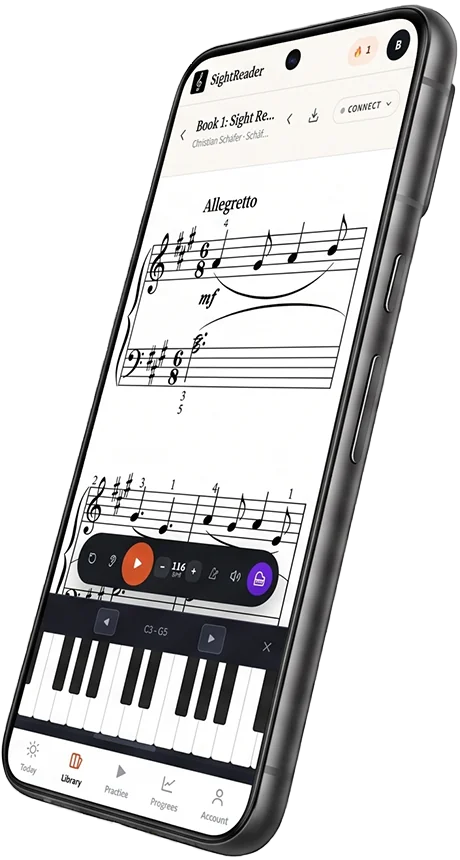
This app is absolutely amazing! 🎹 As a music teacher, I find it incredibly helpful for both my students and my own practice. I love that it offers Grades 1–8, giving students a clear path to improve and keep challenging themselves as they progress. You can connect your piano directly through MIDI, and the app can also listen to you play through audio, which makes practicing feel much more interactive. The real-time feedback, different difficulty levels, and variety of exercises make it an excellent tool for building sight-reading skills. It’s especially helpful for students because they can practice on their own and immediately see how they’re doing. I highly recommend it to any piano teacher or student looking to become a stronger sight-reader! 🎼🔥
S Sethy1217 🎓 Music teacher 6 Sept 2026
Helps make piano practice more fun!
I have been really enjoying using the app for sight reading practice! I enjoy the different modes, which keeps practice feeling fresh, and the app makes it easy to find new repertoire. Highly recommended!
J JHolifield4 29 Aug 2026
Great App & Support
Loved the look of the app but had a few technical problems with the app not playing sounds while phones are on silent. Emailed Bret and he sorted it for me. Wonderful app and support.
S Sutes1 27 Aug 2026
Great app for sight reading!
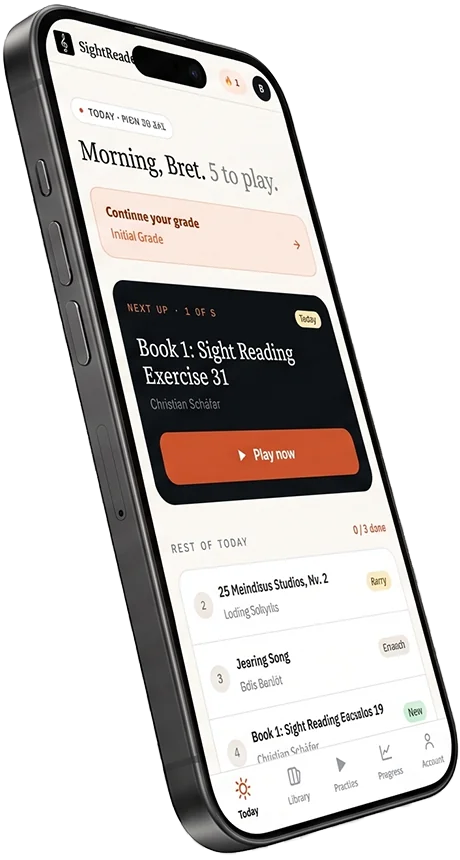
This is an extremely helpful app for sight reading! It’s very easy to navigate and I like the variety of different practice modes. You can follow specific grade-based exercises or explore the extensive library, which adds a lot of flexibility. The virtual inbuilt keyboard is also so handy to use on the go. I wish I’d had this app back when I was doing grades many years ago!
F FrostyTheSnowgirl1 20 Jul 2026
Brilliant app
Absolutely brilliant app, made me improve everyday. 100% recommend
J Joel_009 20 Jul 2026
Brilliant
Such a well laid out app, with clear instructions on how to use it and how to better yourself on piano. Really handy app to have. Highly recommend it🎹
L Lauren . H 20 Jul 2026
Learning to play made easy!
I’ve always wanted to learn to read music and play the piano. On a whim, I downloaded this app and I’m quite impressed! It’s very simple, straightforward, and I’ve been able to pick it up pretty quickly. My ADHD brain absolutely loves this and I’m excited to continue learning!!
N nrarp 10 Sept 2026
Great Experience
P Polo S 27 Aug 2026
I’m a complete beginner at piano, and after trying several services for learning to read sheet music, I’ve found yours to be by far the best.
A Artúr Working towards Grade 1 5 Sept 2026
The best sight reading app
This app is absolutely amazing! 🎹 As a music teacher, I find it incredibly helpful for both my students and my own practice. I love that it offers Grades 1–8, giving students a clear path to improve and keep challenging themselves as they progress. You can connect your piano directly through MIDI, and the app can also listen to you play through audio, which makes practicing feel much more interactive. The real-time feedback, different difficulty levels, and variety of exercises make it an excellent tool for building sight-reading skills. It’s especially helpful for students because they can practice on their own and immediately see how they’re doing. I highly recommend it to any piano teacher or student looking to become a stronger sight-reader! 🎼🔥
S Sethy1217 🎓 Music teacher 6 Sept 2026
Helps make piano practice more fun!
I have been really enjoying using the app for sight reading practice! I enjoy the different modes, which keeps practice feeling fresh, and the app makes it easy to find new repertoire. Highly recommended!
J JHolifield4 29 Aug 2026
Great App & Support
Loved the look of the app but had a few technical problems with the app not playing sounds while phones are on silent. Emailed Bret and he sorted it for me. Wonderful app and support.
S Sutes1 27 Aug 2026
Great app for sight reading!
This is an extremely helpful app for sight reading! It’s very easy to navigate and I like the variety of different practice modes. You can follow specific grade-based exercises or explore the extensive library, which adds a lot of flexibility. The virtual inbuilt keyboard is also so handy to use on the go. I wish I’d had this app back when I was doing grades many years ago!
F FrostyTheSnowgirl1 20 Jul 2026
Brilliant app
Absolutely brilliant app, made me improve everyday. 100% recommend
J Joel_009 20 Jul 2026
Brilliant
Such a well laid out app, with clear instructions on how to use it and how to better yourself on piano. Really handy app to have. Highly recommend it🎹
L Lauren . H 20 Jul 2026
Learning to play made easy!
I’ve always wanted to learn to read music and play the piano. On a whim, I downloaded this app and I’m quite impressed! It’s very simple, straightforward, and I’ve been able to pick it up pretty quickly. My ADHD brain absolutely loves this and I’m excited to continue learning!!
N nrarp 10 Sept 2026
Great Experience
P Polo S 27 Aug 2026
I’m a complete beginner at piano, and after trying several services for learning to read sheet music, I’ve found yours to be by far the best.
A Artúr Working towards Grade 1 5 Sept 2026
The best sight reading app
This app is absolutely amazing! 🎹 As a music teacher, I find it incredibly helpful for both my students and my own practice. I love that it offers Grades 1–8, giving students a clear path to improve and keep challenging themselves as they progress. You can connect your piano directly through MIDI, and the app can also listen to you play through audio, which makes practicing feel much more interactive. The real-time feedback, different difficulty levels, and variety of exercises make it an excellent tool for building sight-reading skills. It’s especially helpful for students because they can practice on their own and immediately see how they’re doing. I highly recommend it to any piano teacher or student looking to become a stronger sight-reader! 🎼🔥
S Sethy1217 🎓 Music teacher 6 Sept 2026
Helps make piano practice more fun!
I have been really enjoying using the app for sight reading practice! I enjoy the different modes, which keeps practice feeling fresh, and the app makes it easy to find new repertoire. Highly recommended!
J JHolifield4 29 Aug 2026
Great App & Support
Loved the look of the app but had a few technical problems with the app not playing sounds while phones are on silent. Emailed Bret and he sorted it for me. Wonderful app and support.
S Sutes1 27 Aug 2026
Great app for sight reading!
This is an extremely helpful app for sight reading! It’s very easy to navigate and I like the variety of different practice modes. You can follow specific grade-based exercises or explore the extensive library, which adds a lot of flexibility. The virtual inbuilt keyboard is also so handy to use on the go. I wish I’d had this app back when I was doing grades many years ago!
F FrostyTheSnowgirl1 20 Jul 2026
Brilliant app
Absolutely brilliant app, made me improve everyday. 100% recommend
J Joel_009 20 Jul 2026
Brilliant
Such a well laid out app, with clear instructions on how to use it and how to better yourself on piano. Really handy app to have. Highly recommend it🎹
L Lauren . H 20 Jul 2026
Learning to play made easy!
I’ve always wanted to learn to read music and play the piano. On a whim, I downloaded this app and I’m quite impressed! It’s very simple, straightforward, and I’ve been able to pick it up pretty quickly. My ADHD brain absolutely loves this and I’m excited to continue learning!!
N nrarp 10 Sept 2026
Great Experience
P Polo S 27 Aug 2026
I’m a complete beginner at piano, and after trying several services for learning to read sheet music, I’ve found yours to be by far the best.
A Artúr Working towards Grade 1 5 Sept 2026
The best sight reading app
This app is absolutely amazing! 🎹 As a music teacher, I find it incredibly helpful for both my students and my own practice. I love that it offers Grades 1–8, giving students a clear path to improve and keep challenging themselves as they progress. You can connect your piano directly through MIDI, and the app can also listen to you play through audio, which makes practicing feel much more interactive. The real-time feedback, different difficulty levels, and variety of exercises make it an excellent tool for building sight-reading skills. It’s especially helpful for students because they can practice on their own and immediately see how they’re doing. I highly recommend it to any piano teacher or student looking to become a stronger sight-reader! 🎼🔥
S Sethy1217 🎓 Music teacher 6 Sept 2026
Helps make piano practice more fun!
I have been really enjoying using the app for sight reading practice! I enjoy the different modes, which keeps practice feeling fresh, and the app makes it easy to find new repertoire. Highly recommended!
J JHolifield4 29 Aug 2026
Great App & Support
Loved the look of the app but had a few technical problems with the app not playing sounds while phones are on silent. Emailed Bret and he sorted it for me. Wonderful app and support.
S Sutes1 27 Aug 2026
Great app for sight reading!
This is an extremely helpful app for sight reading! It’s very easy to navigate and I like the variety of different practice modes. You can follow specific grade-based exercises or explore the extensive library, which adds a lot of flexibility. The virtual inbuilt keyboard is also so handy to use on the go. I wish I’d had this app back when I was doing grades many years ago!
F FrostyTheSnowgirl1 20 Jul 2026
Brilliant app
Absolutely brilliant app, made me improve everyday. 100% recommend
J Joel_009 20 Jul 2026
Brilliant
Such a well laid out app, with clear instructions on how to use it and how to better yourself on piano. Really handy app to have. Highly recommend it🎹
L Lauren . H 20 Jul 2026